QR Code Reader from Image
Read a QR code from a PNG, JPEG or WebP image in your browser. Free, no account, no camera and no automatic link opening.
Try a fictional file
Try a fictional file
Read text encoded in a QR image.
These small practice files are generated locally from fictional data. Download one, then select it yourself in the existing tool. Nothing is selected, run, cleared or replaced automatically. Processing stays in your browser; loading this page and its practice files still requests site assets.
Download practice file (sample-qr.png)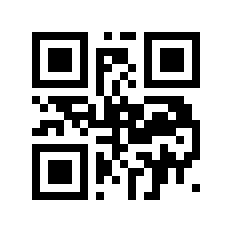
What to do
Select sample-qr.png and run the reader. Compare the decoded text below.
How to read the result
Expect exactly FICTIONAL-QR-42. This is text, not a link. Reading a QR code does not establish its safety; do not automatically open unknown destinations.
FICTIONAL-QR-42
Keep your original. Open the downloaded result and check it before sharing. If your browser cannot process this format, use this walkthrough; no result is guaranteed.
Share this tool
Only the tool’s public link is shared. Your inputs and results stay here.
Show link to copy manually
Quick answer
Choose a QR image or screenshot to inspect its text locally before deciding what to do with it.
The page and its assets load from the site; this operation uses your entered values only in this browser and does not send them to a calculation endpoint.
How to use it
Choose one image and select Read QR code. Copy the decoded text if needed, or use Clear to remove the selected image and result.
Limits
One QR code per image; PNG, JPEG and WebP up to 10 MB and 16 megapixels. Damaged, blurred or unusual codes may not decode. Animated images are read as a still frame. Decoding does not prove a link is safe.
A step-by-step example
Frequently asked questions
Will a decoded link open automatically?
No. Decoded content is displayed as inert text. The tool does not navigate, join a network, make a payment or sign in anywhere.
Does this tool use my camera or upload the image?
No camera permission is requested. Image decoding uses this browser; normal requests still load the page and its code.
What if an image contains several QR codes?
This version reads at most one code. Crop the image to a single full QR code, including its border, and try again.
Sources and references
These references document the cited standard or browser API; they do not validate the tool’s output.